

Do it all with Digital Banking, anytime, anywhere!
If you're connected to the internet, you're connected to SCCU. It's free, fast, and secure 24/7.
- Transfer Funds
- Pay Bills
- Order Checks
- View Up To 24 Months of Statements
- Apply for Loans
- View graphs of spending patterns
- Check balances
- View history
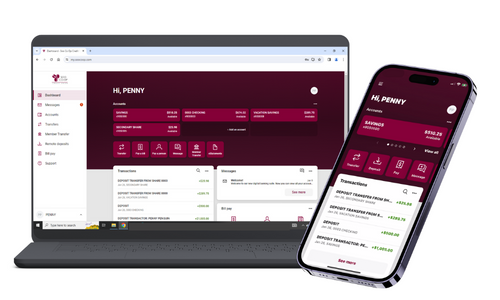
- Pay bills
- Debit Card Controls
- Block your MasterCard Debit Card anytime, anywhere right from your mobile phone. (This type of block is a permanent block. You will need to contact the credit union to order a new debit card.)
- Schedule a Travel Notice
- Check messages
- Transfer funds
- Remote Deposit Capture
- Deposit your checks anywhere, anytime — our remote deposit capture service is free and easy to use. You'll save a trip to the branch by using your mobile phone to deposit checks securely.
- Find branch and ATM locations



Key Features:
- Forgot Password functionality on Mobile and Web clients.
- Change Password option on Mobile and Web clients.
- Create secondary shares without visiting our branches.
- Apply for loans through Mobile and Web clients.
- Updated 2FA (2 Factor Authentication) methods.
- Streamlined experience for mobile-only users.
Digital Banking Walkthroughs:
First-Time Login
- First Time Login (iPhone) PDF Guide | Video Guide
- First Time Login (Android) PDF Guide | Video Guide
- First Time Login (Web) PDF Guide | Video Guide
- Digital Banking: Making the Switch
Signing Up
Logging In & Navigating the App
Digital Transactions
Digital Services
- eAlerts User Guide (NEW MODULE)
- eStatements - Accessing & Enrolling
- Visa eZCard Info Guide
- Apply for a Loan in Digital Banking
Mobile Banking User Guides
REQUENTLY ASKED QUESTIONS:
e-Alerts
Create custom e-Alert messages to be sent to your cell phone, email, or both.
- Account Balance
- Deposit Transactions
- Withdrawal Transactions
- Checks Cleared
- E-mail Change
- Name/Address Change
How to sign up:
- Log into SCCU's online banking
- Select e-Alert Notifications from the top menu
- Selecting e-Alert/Notifications
eAlerts User Guide (NEW MODULE)
BILL PAY
SCCU's Online Bill Pay gives you the ability to pay all your bills in one place. Free yourself from the hassle of writing and mailing checks.
Just a couple of clicks and your bill payments are sent when and where you need them to be. Fast, simple, and free, our Bill Pay tool lets you schedule one-time or automatic recurring payments for rent, cable, utilities, and more. With SCCU's Bill Pay you control who gets paid and when - best of all it's FREE!
To get started, all you need to do is sign in to your account and select the "Bill Pay" tab.
E-STATEMENTS
e-Statements offer a safe and secure way to store your financial information. You can easily view and print current or past statements without the potential fraud risk that comes with paper statements. And, you can take part in an environmentally friendly alternative to printing on paper.
How to Enroll
- Log in to Online Banking and select “e-Statements” from the Services menu tab at the top of the page.
- A page will appear describing our e-Statement service. Once you have read the brief description click “Enroll” to continue.
- You may be asked to verify your current email address after you verify click “Next”.
- You will be presented with an e-Statement Disclosure, if you agree to the Terms and Conditions click “Finish” to enroll.
CARDNAV
CardNavSM by CO-OP
New security and control for cardholders.
Introducing unprecedented, real-time control over your SCCU Debit Card through your smartphone.
CardNav adds another level of security to your cards by letting you decide how and when they can be used and alerting you when any types of transactions you specify take place. You can even use CardNav to set personal spending limits that help you stay within your budget goals.
- Turn cards on or off in seconds.
- Use GPS to restrict transactions to businesses within a designated area.
- Limit card use to specific merchants or purchases.
- Receive real-time, in-app alerts that let you stop unauthorized purchases before they’re complete.
- Receive alerts when you’re getting close to any personal spending limits you’ve set.
Gain a new level of security and control over your money today.

